Accepted a translation job & not sure how to edit each piece together?
English to Auslan
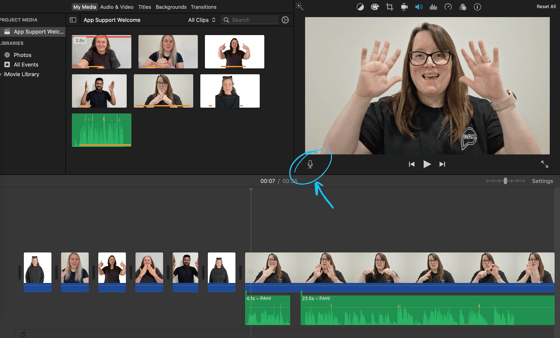
MacBook - iMovie
- Download video → Upload into iMovie
- Use microphone icon (bottom left of main picture) to record voiceover as video plays.
Can be done in multiple sittings.
Voice recording can also be trimmed, and restarted.
As easy as that! ✨
PC - Clipchamp
- Download video → Navigate to Clipchamp
- Using the side bar, find "My Media" → Import Media. Drag video to the workspace (middle)
- Duplicate tab / window of Clipchamp.
- On the second tab, navigate to "Record & Create" > Select "Audio"
- Play video on first tab. Begin Audio Recording on second tab.
- Make sure audio lines up & save finished project!
All else fails? - Zoom
-
Start new Zoom meeting & screen share video.
- Turn your camera off 😶🌫️
- Record meeting.
- Begin video & complete your translation!